Yandex Cookie Spy : Free tool to view, track and delete website cookies stored by Yandex browser | SecurityXploded
|
| Yandex Cookie Spy
Version: 1.0
|
|
|
|
|
|
|
|
| |
|
|
| |
|

|
Yandex Cookie Spy is the free tool to recover, track and delete website cookies stored by Yandex browser |
|
|
It supports all Yandex browsers starting from v10 and higher. It automatically determine Cookies file based on version of Yandex browser and then decrypts all stored cookies with corresponding encryption algorithm
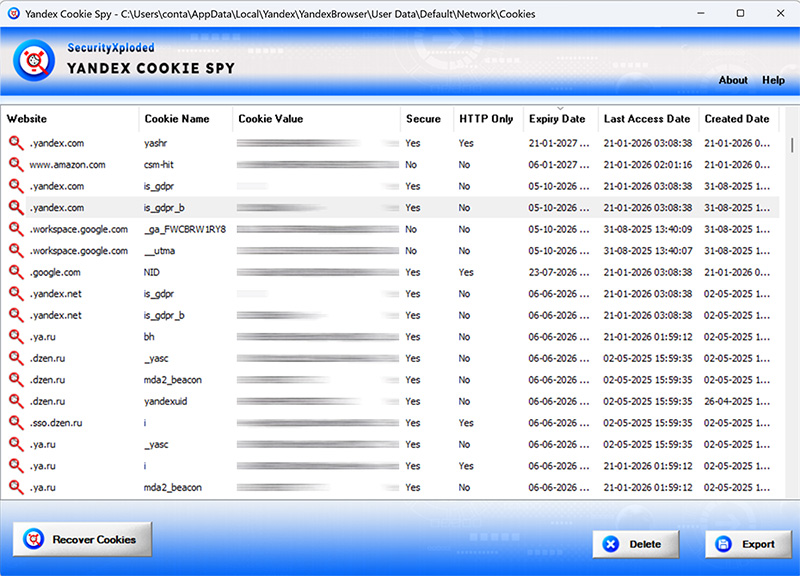
On successful recovery, it shows detailed information for each cookie like website, cookie name, cookie value, isSecure, HTTP only, create date, last access date & expiry date.
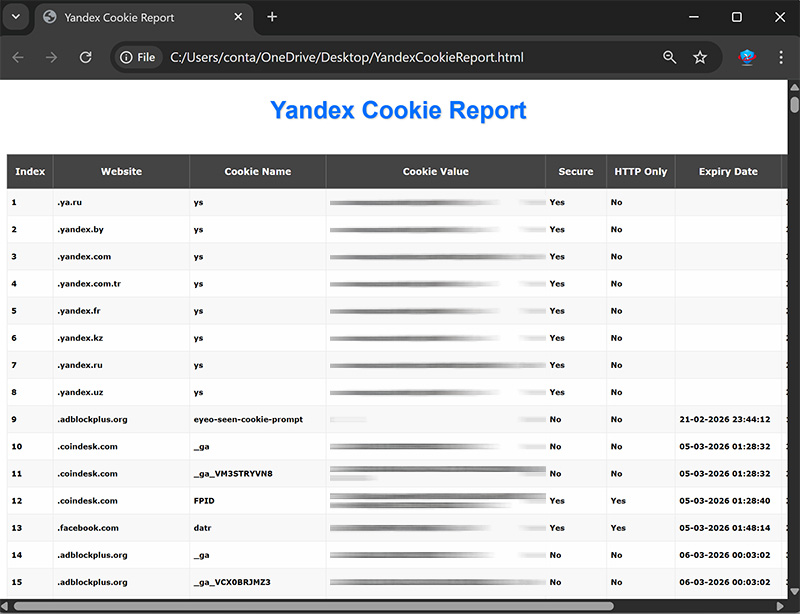
You can also delete the one or more cookies at once. And finally backup all the recovered cookies to HTML file with a click of button.
Yandex Cookie Spy is handy tool for forensic investigators, security professionals, app developers. Also individuals can find it useful to easily track & delete secret cookies stored by various websites.
Yandex Cookie Spy supports all Windows platforms from Vista to Windows 11 |
| |
|
- Instantly decrypt and recover all cookies from Yandex browser
- Works with Yandex v10 and newer versions
- See full cookie details — website, name, value, security flags, access & expiry dates
- Delete unwanted cookies with one click
- Right-click to copy, visit site, or remove cookie
- Save cookie list to HTML file
- Useful for forensic investigators, security professionals, web developers, and regular users
- Compatible with Windows Vista through Windows 11
|
| |
|
|
Yandex Cookie Spy is easy to use with its simple GUI interface. |
|
Here are the brief usage details
- Launch "Yandex Cookie Spy" software
- Click "Recover Cookies" and select your browser profile
- Next click on "Start Recovery" to view all cookies instantly
- Right-click any cookie to copy details, visit the site, or delete it
- Export the full list to an HTML file
|
|
|
|
 |
 |
| |
|
|
|
| |
| |
|
|
| |
|
|
|
|
|
|
|
|
|